Configuring Webservice Calls
The external data source can be enhanced to make external assembly calls to look up data (e.g., to view and select external data from SAP from within SmartSolve). This lookup capability is not limited only to Webservices, and can call any third party application data. However, the wrapper assembly should be written in Microsoft.Net.
Follow the steps below to configure Webservice Calls.
- Write an assembly to lookup the data.
NOTE: The caller method needs to use following signature:
- public DataSet WebServiceDataLookup(String UserName, String Password, String URL, String[] DataInput)
- Add the following code before returning the dataset to specify which columns will be returned to the SmartSolve field (you can return multiple data fields). Replace the names of Column 1 and Column 2 below with the name of the fields in your data.
ds.ExtendedProperties.Add("SelectValueColumns","Column 1,Column 2");
- Copy the assembly into the SmartSolve application bin folder.
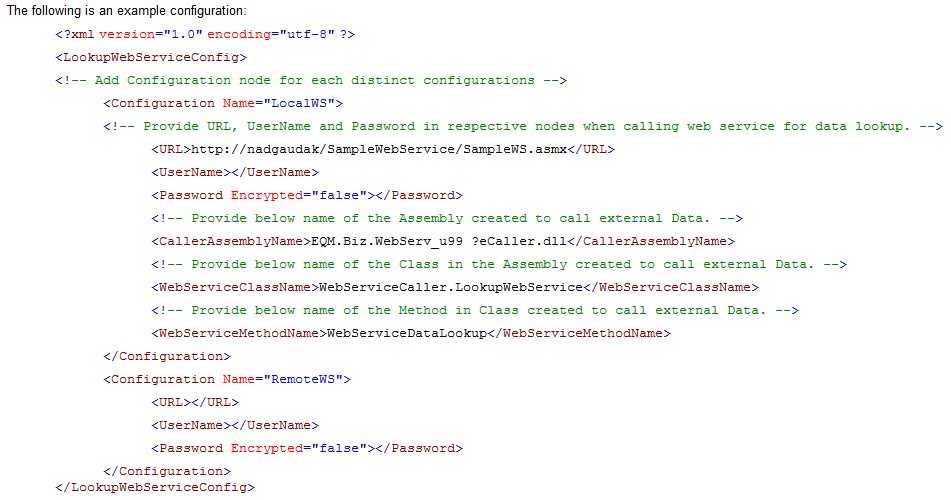
- Provide the necessary information of this assembly in the external Assembly.config file (This webserviceconfig file is provided to you by IQVIA).
NOTES:
- Configuration Name must be unique for each data source.
- Keep URL blank if you are not using the webservice call.
- You can use your own names for the Webservice class name.
- You can use your own names for the Webservice method name.
- In the zoom for External Datasource, set the properties for zoom page to include the name of the configuration to be used.
EXAMPLE:

NOTES:
- The example entry above uses the configuration named LocalWS to make a call to web service.
- ExternalDataDisplay.aspx?RequestType=ExternalAssembly&ConfigName=LocalWS must be entered exactly when setting the Zoom properties.
- Please see Working with Forms for more information on setting field properties.
- Test your configurations in run time.
See Also
Deleting External Data Sources
Exporting External Data Sources
Importing External Data Sources